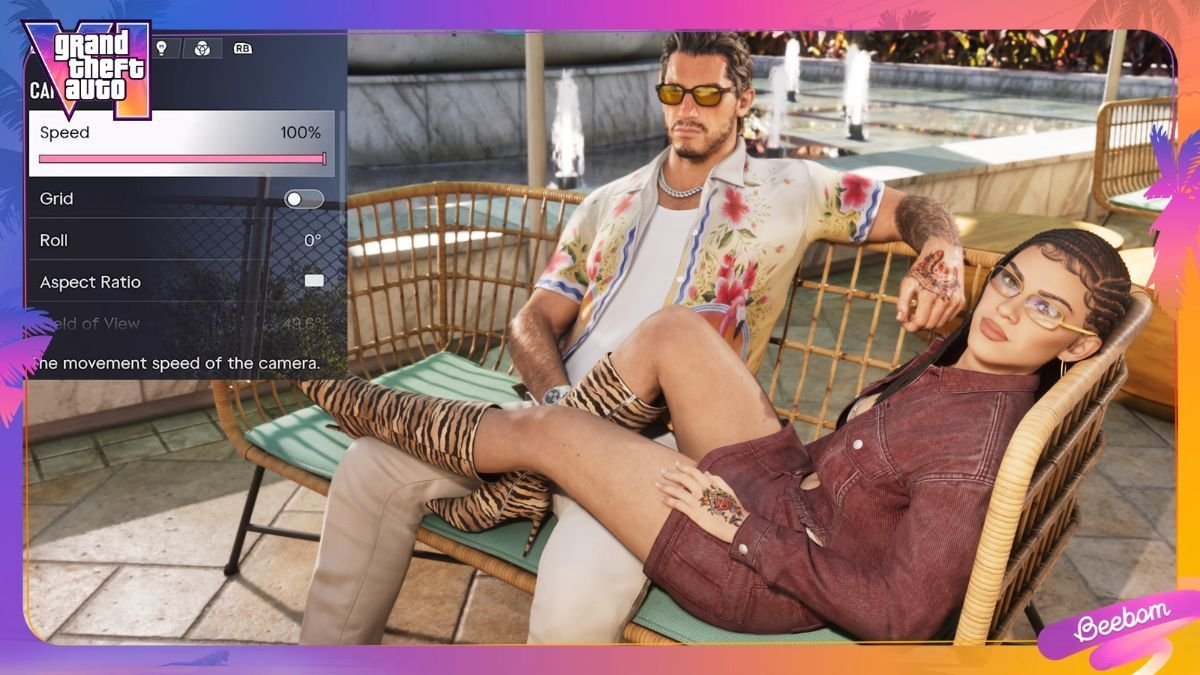
Grand Theft Auto 6 includes a dedicated photo capture system that lets players document their favorite moments across the game's expansive open world. The feature, officially named Photo Studio, is built into the pause menu and becomes available immediately when you take control of protagonist Lucia in the prologue, with no missions required to unlock it.
Accessing Photo Studio from the Pause Menu
Photo Studio is straightforward to reach during gameplay. Press the Options button on PlayStation 5 or the Menu button on Xbox Series X|S to pause the game, then select Photo Studio from the pause menu. Once you enter Photo Studio, you can adjust various camera features before capturing your shot. When you are satisfied with your composition, select Save Photo to store the image, or hide the interface and use your console's native screenshot feature instead.

Photo Studio offers extensive customization options for framing and editing your captures. You can change camera angles and adjust depth of field to control focus and blur effects. The tool also supports up to five different light sources, each of which can be individually customized in terms of color and intensity to create specific lighting atmospheres. A wide range of filters and visual effects are available to alter the mood and appearance of your screenshots. If you want a cleaner composition, you can hide your character from the shot entirely.
Limitations and Restrictions
While Photo Studio is powerful, it does have boundaries. The tool does not allow you to change the time of day or weather conditions within a screenshot, meaning you are limited to capturing moments as they naturally occur in the game world. You can use Photo Studio during cutscenes as well, but certain customization options will be restricted during these moments and will appear as "Currently Unavailable" when you attempt to access them. This limitation ensures that cinematic sequences maintain their intended visual presentation.
Taking Selfies with the Smartphone Camera
Beyond Photo Studio, GTA 6 provides an alternative photo capture method through the in-game smartphone. The Camera app becomes available after you progress through Lucia's prologue and gain control of Jason. To access it, press D-Pad Up on your controller to open the phone menu, then select the Camera app, which appears as the third icon in the first row.
The smartphone camera includes both rear and front-facing options. Switch to the front-facing selfie camera to take photos with Jason and Lucia. The smartphone camera offers six different poses and seven distinct facial expressions for Jason, allowing you to customize how he appears in selfies. When taking photos together with your partner, you can also adjust their pose to create varied compositions.
The rear camera on the smartphone supports additional features including up to 5x zoom capability, grid lines for composition assistance, and access to 17 different filters. These tools help you frame shots precisely and apply stylistic effects to your photos. After capturing images, you can view all your previously taken photos through the Gallery app on the smartphone.
Sharing and Social Features
GTA 6 brings back Snapmatic, an in-game social media platform where you can share your captured moments with other players. Within Snapmatic, you can browse posts from other players, like photos you enjoy, read comments on shared images, and mark interesting locations on your in-game map based on what you see in photos. This social layer adds a community dimension to photo capture, encouraging players to share their best shots and discoveries with the broader player base.
Whether you prefer the comprehensive customization of Photo Studio or the quick selfie functionality of the smartphone camera, GTA 6 provides multiple ways to preserve and share your favorite moments throughout the game.
Related Articles
About the Author